
If you are looking for a Jetpack Stats alternative for WordPress, Koko Analytics gives you similar traffic insights while storing all analytics data on your own server. It is built for site owners who want simple WordPress statistics without sending visitor data to a third-party analytics service.
A lot of WordPress websites have been using Jetpack Stats to understand what is happening on their website. It used to be a convenient plug-and-play solution for getting basic metrics into the WordPress dashboard.
That said, there are a few issues with relying on Jetpack Stats for your site’s most important metrics.
Firstly, there are several privacy-related issues as Jetpack stores its data (including the IP address of your visitors) on Automattic’s servers and not your own.
Furthermore, Jetpack Stats is no longer free for commercial websites. This change in pricing forced a lot of websites to consider alternatives.
Jetpack Stats vs Koko Analytics
| Feature | Jetpack Stats | Koko Analytics |
|---|---|---|
| Data storage | Automattic servers | Your own WordPress database |
| External service required | Yes | No |
| Open source | Part of the Jetpack ecosystem | Yes |
| Core analytics | Subject to Jetpack’s commercial-use pricing | Free core plugin |
| Historical import | Export through the WordPress.com API | Built-in Jetpack Stats importer |
Why Koko Analytics is a good Jetpack Stats alternative
Koko Analytics is a self-hosted Jetpack Stats alternative for WordPress sites that want privacy-friendly analytics without sending visitor data to a third-party service. The most important benefit is that all data is processed and stored on your website’s server only.
The plugin processes data in a background process that is heavily optimized for performance. Since there are no external requests to be made, this will usually be faster than communicating with a third-party server. Unless your website receives more than 1,000 visitors per second, the performance impact of this processing is negligible.
Since only aggregated statistics, like the number of times a post was viewed on a given date, are stored, there is no need to worry about database size either. Throughout our years of maintaining the Koko Analytics plugin we have talked to several users with thousands of posts and millions of visitors, yet the database tables clocked in at less than 10 MB worth of data.
For most WordPress sites, local processing is simple, fast, and keeps ownership of analytics data with the site owner.


Koko Analytics is open-source software that doesn’t rely on third parties
Koko Analytics is an open-source freemium plugin. The core plugin is free, and we have some more advanced features available through a paid add-on plugin.
You don’t have to just take our word on this though. Because the plugin functions completely on your own servers and the code itself is available under an open-source license, you can simply keep on running any version of it indefinitely, no matter what happens.
Migrating from Jetpack Stats to Koko Analytics
Since Jetpack Stats has been around for well over 10 years now, you may have a decade worth of data in there that you don’t want to part with. Because this data lives on Automattic’s server, exporting it is not as straightforward as copying some file or performing a database dump.
Terence Eden recently dove into the WordPress.com API and found a way to “liberate your daily statistics from JetPack” and then import this data into Koko Analytics. Inspired by his work, we turned this into a core feature for Koko Analytics so that you can now import data from Jetpack Stats without having to write a single line of code.
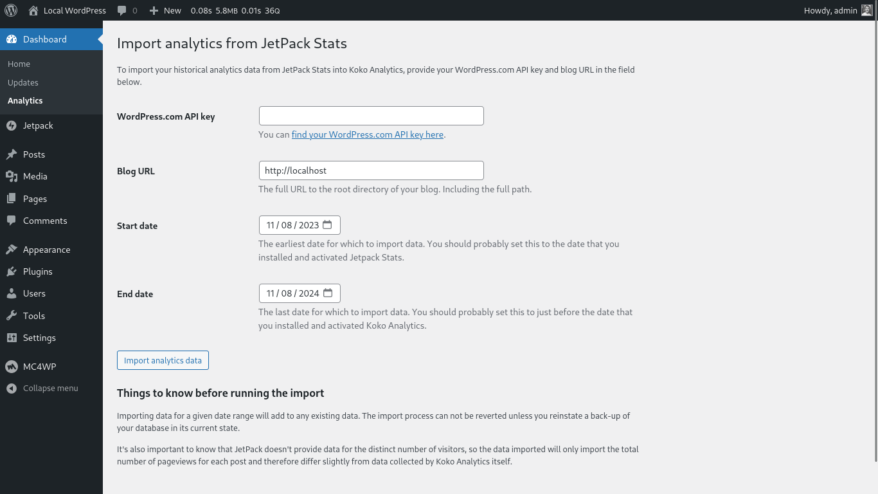
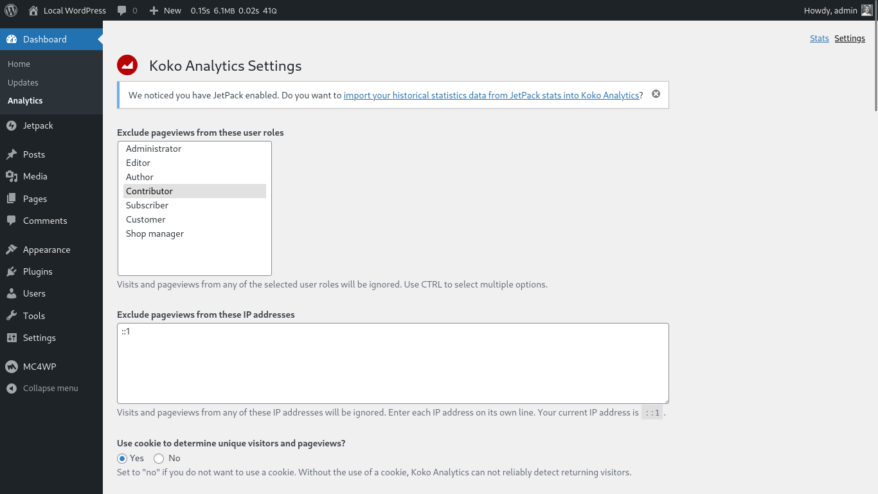
To access this feature, ensure you are running Koko Analytics version 1.4.4 or later and head to the settings page over at WP Admin > Dashboard > Analytics > Settings. If you have Jetpack Stats enabled, you’ll find a notice at the top of the page with a link that takes you to the screen shown above.
If you are ready to move your old data over, follow our step-by-step guide to importing historical data from Jetpack Stats into Koko Analytics.
What to know before importing Jetpack Stats data
There are several things that are important to note before running the import process:
- The import process will add to any existing data already present for the given date range. If you have been running Koko Analytics alongside Jetpack Stats for a while, pay careful attention to the start and end date fields.
- Jetpack Stats provides pageview counts, but not the number of unique visitors. After the import, your visitor count for the imported period will show as zero.
- If you have data in Koko Analytics that you care about, we recommend taking a backup of your Koko Analytics database tables before running the import process.
If you are coming from Jetpack Stats to Koko Analytics and have any questions or feature requests, don’t hesitate to either get in touch, open a topic on the WordPress.org plugin support forums, or submit a feature idea on our GitHub discussions board.
Welcome to the community!
