
We just released Koko Analytics Pro 2.3.3, which adds a much requested feature: UTM tracking.
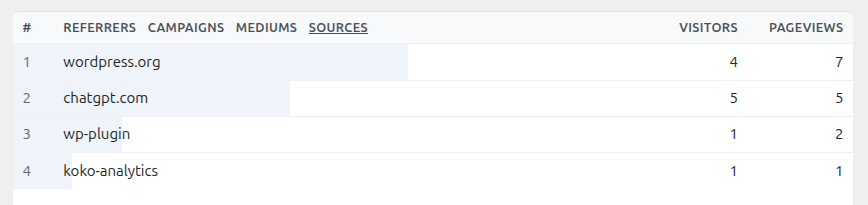
This means you can now see which campaigns, links, and channels bring visitors to your site, directly from your Koko Analytics dashboard.
What is UTM tracking?
UTM parameters are small pieces of information that you add to a link. They are commonly used to track where visitors came from, for example from a newsletter, a social media post, or a paid campaign.
A link with UTM parameters can tell you the campaign name, traffic source, and medium. That makes it easier to see which marketing efforts are bringing people to your site.
The most common UTM parameters are utm_source, utm_medium, and utm_campaign. Together, they can tell you things like whether a visit came from a newsletter, a social post, or a specific campaign link.
For a practical guide with examples and naming tips, see our knowledge base article on tracking UTM parameters with Koko Analytics Pro.
Campaign reports in Koko Analytics Pro
With Koko Analytics Pro 2.3.3, campaign traffic is now tracked and reported in your dashboard. You can use this to compare traffic from newsletters, social posts, partner links, ads, or any other campaign link you share.
As with the rest of Koko Analytics, this is done without adding external tracking services to your site. Your analytics data stays on your own server.
Support in the free plugin
Koko Analytics 2.3.7 also includes a related change in the free plugin. Pageview tracking requests now include UTM parameters, so integrations can access campaign data when it is present.
The actual UTM reports are part of Koko Analytics Pro, but this change makes sure the tracking layer passes along the information needed for campaign reporting.
More reliable tracking requests
This release also includes several internal improvements to the tracking endpoint. We tightened request validation, improved how request data is handled inside WordPress, and made buffer and session file writes more reliable.
These changes are not as visible as UTM tracking, but they help make tracking more robust, especially on busy sites or sites with unusual server setups.
License keys for Pro
Koko Analytics Pro 2.3.3 also switches license activations to license keys. This should make activating Pro more straightforward and easier to manage going forward.
We also fixed the activation notice on the plugins page, so it shows up again when Pro is installed but not yet activated.
Update today
Koko Analytics 2.3.7 is available now on WordPress.org and through automatic updates in your WordPress dashboard.
If you are using Koko Analytics Pro, update to version 2.3.3 to start using UTM tracking and the new license key flow.
If you are not using Pro yet and want to learn more about campaign tracking, visit the Koko Analytics Pro features page or view pricing.
